.svg)
.svg)
PRODUCTS

A course platform we worked with had 400+ lectures, each between 30 and 90 minutes long. Their completion rate was sitting around 22%. Students would start a lecture, scrub around trying to find the section they cared about, give up, and leave. The team knew chapters would help. They also knew that asking 60 instructors to manually timestamp their recordings was never going to happen.
So they tried automating it. The first attempt was a Python script that split videos at silence gaps. It worked for maybe 30% of the content. The rest, lectures with background music, conversational pauses, live coding sessions, came out with chapter breaks in nonsensical places.
The fix was not a better splitting rule. It was letting AI figure out where the topics actually change. Useful chapter breaks can come from several signals: scene detection picks up visual transitions like slide changes and whiteboard switches. Transcript analysis segments by topic shifts in spoken content. Screen transition detection catches application switches in screen shares. Each signal works best for different lecture formats.
For this platform, most of the catalog was slide-based or screen-share-heavy, so scene detection carried the majority of the work. But the point holds generally: the right chaptering approach depends on what your lectures look like. Here is how to wire it up.
Key takeaways:
Students prefer video. That is not in question. But "prefer video" does not mean "will sit through 60 minutes of it." Most learners engage best with shorter, focused segments. A 45-minute lecture recorded in one take creates a gap between how the content is delivered and how students actually want to consume it.
Chapters close that gap. They turn a 45-minute monolith into 8 or 10 navigable sections. A student reviewing for an exam can jump directly to "Database Normalization" at 23:14 instead of scrubbing through the first 20 minutes of setup context.
Chapters are not a nice-to-have. They are the difference between a lecture that gets watched once and one that gets revisited as a study tool
For a course with 5 lectures, manual chaptering is fine. An instructor watches the recording, notes the timestamps, types them up. Maybe 20 minutes of work per lecture.
Now scale that to 200 lectures. Or 2,000. That is 66 hours of someone watching video just to write timestamps. And that is before you account for curriculum updates. Every time an instructor re-records a lecture, the old chapters become wrong. Someone has to redo them.
Most platforms deal with this by not offering chapters at all. The feature request sits in the backlog. Everyone agrees it matters. Nobody has the bandwidth.
AI video tools are already compressing production timelines dramatically. Research suggests they can reduce course production time from 80+ hours to under 5 hours (X-Pilot, 2026). Chaptering fits the same pattern. The manual version does not scale. The automated version does.
Not all chapters are equal. A chapter labeled "Section 3" at the 15-minute mark is barely better than nothing. Good chapters need three things.
Descriptive titles. "Introduction to Binary Search Trees" is useful. "Part 2" is not. AI scene detection generates descriptions based on what is visually happening in each segment, which often maps to the slide title or topic being discussed.
Accurate timestamps. Off by 30 seconds and the student lands in the middle of a different topic. Scene detection anchors chapter breaks to actual visual transitions, which tend to be more precise than human estimates.
Reasonable granularity. A 45-minute lecture probably needs 6 to 12 chapters. Two is too few. Twenty creates noise. AI detection adapts to the content rather than splitting at fixed intervals.

Platforms competing for learner attention need content that feels like a product, not a recorded Zoom call. Chapters are one of the simplest ways to close that gap.
Here is the general workflow, regardless of which video API you use.
The critical decision is where you store the chapter data. You can fetch from the API every time, or cache it in your own database alongside course metadata. For a course platform, caching is the right call. Instructors need to edit chapter titles, reorder them, or merge segments. That requires your own data layer.
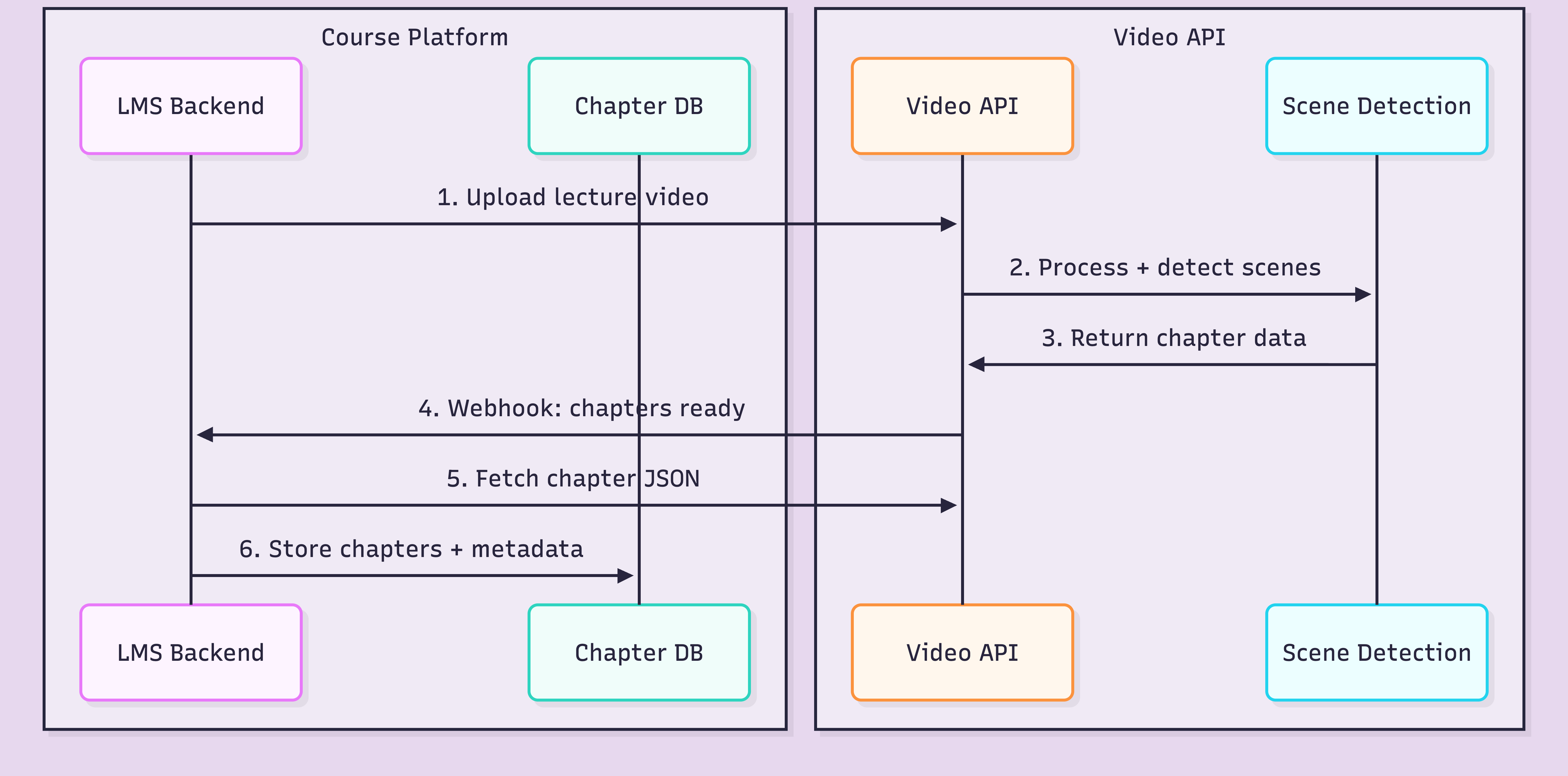
The integration point is step 6: getting the structured data into your system. Same workflow whether you are building from scratch or adding chapters to an existing platform.
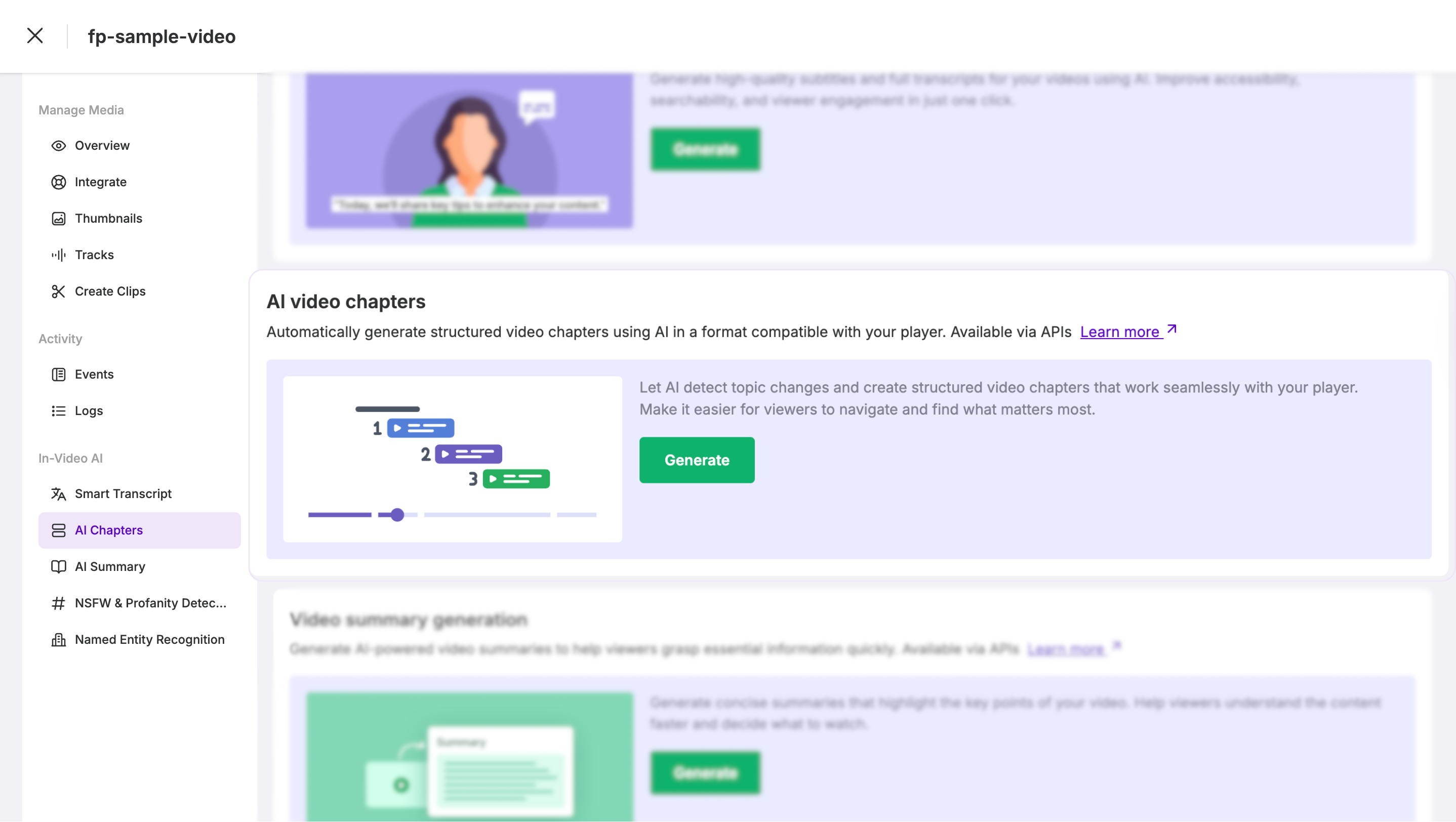
FastPix In-Video AI supports this workflow through an API-based processing pipeline. In-Video AI runs scene detection as part of the standard processing step. No model training, no separate infrastructure. You upload a video, and scene-level data comes back alongside the encoded output.
Send the lecture to the FastPix on-demand upload endpoint with metadata that links it back to your course structure.
curl -X POST https://api.fastpix.io/v1/on-demand \
  -u "$ACCESS_TOKEN_ID:$SECRET_KEY" \
  -H "Content-Type: application/json" \
  -d '{
    "inputs": [
      {
        "type": "video",
        "url": "https://your-storage.com/lectures/cs101-lecture-7.mp4"
      }
    ],
    "metadata": {
      "course_id": "cs101",
      "lecture_title": "Binary Search Trees and Balancing",
      "lecture_number": "7",
      "instructor": "Dr. Chen"
    },
    "accessPolicy": "public",
    "maxResolution": "1080p"
  }'


The response gives you the IDs you need for everything that follows.

{
  "success": true,
  "data": {
    "id": "a1b2c3d4-e5f6-7890-abcd-ef1234567890",
    "playbackIds": [
      {
        "id": "fp_play_9x8y7z6w5v4u",
        "accessPolicy": "public"
      }
    ],
    "metadata": {
      "course_id": "cs101",
      "lecture_title": "Binary Search Trees and Balancing",
      "lecture_number": "7",
      "instructor": "Dr. Chen"
    },
    "status": "preparing"
  }
}


Store the asset id (for fetching chapters) and the playbackId (for streaming).
Once processing completes (you will get a webhook notification), fetch the scene detection results.
curl -X GET https://api.fastpix.io/v1/on-demand/{assetId}/scenes \
  -u "$ACCESS_TOKEN_ID:$SECRET_KEY" \
  -H "Content-Type: application/json"


The response contains structured scene data that maps directly to chapters.

{
  "success": true,
  "data": {
    "scenes": [
      {
        "sceneNumber": 1,
        "startTime": 0.0,
        "endTime": 182.5,
        "description": "Course introduction and recap of previous lecture on linked lists"
      },
      {
        "sceneNumber": 2,
        "startTime": 182.5,
        "endTime": 495.0,
        "description": "Introduction to binary search trees with diagram on whiteboard"
      },
      {
        "sceneNumber": 3,
        "startTime": 495.0,
        "endTime": 843.2,
        "description": "Insertion algorithm walkthrough with code examples on screen"
      },
      {
        "sceneNumber": 4,
        "startTime": 843.2,
        "endTime": 1205.0,
        "description": "Tree balancing concepts and AVL tree rotation demo"
      },
      {
        "sceneNumber": 5,
        "startTime": 1205.0,
        "endTime": 1480.7,
        "description": "Performance comparison of balanced vs unbalanced trees"
      },
      {
        "sceneNumber": 6,
        "startTime": 1480.7,
        "endTime": 1620.0,
        "description": "Summary and next lecture preview on hash tables"
      }
    ]
  }
}
Each scene has a start time, end time, and an AI-generated description. These descriptions become your chapter titles. Some will be perfect. Others will need a human to clean them up.
With the chapter data in hand, build the player-side integration. Here is a minimal example using the FastPix player and vanilla JavaScript.
<div id="course-player">
  <video id="lecture-video" controls>
    <source src="https://stream.fastpix.io/fp_play_9x8y7z6w5v4u.m3u8"
            type="application/x-mpegURL">
  </video>

  <div id="chapter-list"></div>
</div>

<script>
const chapters = [
  { time: 0, title: "Introduction and recap" },
  { time: 182.5, title: "Binary search trees" },
  { time: 495, title: "Insertion algorithm walkthrough" },
  { time: 843.2, title: "Tree balancing and AVL rotations" },
  { time: 1205, title: "Performance comparison" },
  { time: 1480.7, title: "Summary and next lecture" }
];

const video = document.getElementById('lecture-video');
const chapterList = document.getElementById('chapter-list');

chapters.forEach((ch, i) => {
  const btn = document.createElement('button');
  btn.textContent = `${formatTime(ch.time)} - ${ch.title}`;
  btn.onclick = () => { video.currentTime = ch.time; video.play(); };
  chapterList.appendChild(btn);
});

function formatTime(seconds) {
  const m = Math.floor(seconds / 60);
  const s = Math.floor(seconds % 60);
  return `${m}:${s.toString().padStart(2, '0')}`;
}
</script>
In production, you would add active chapter highlighting, keyboard navigation, and mobile-responsive styling. But the point stands: chapters are just data. Once you have the timestamps and titles, the UI is the easy part.
Chapters unlock more than player navigation. Here is what becomes possible when you store chapter data in your database.
Search within lectures. Students type "AVL rotation" and your platform returns a deep link to minute 14:03 of Lecture 7. FastPix also offers AI Search that goes deeper, searching across actual visual and audio content using multimodal indexing.
Progress tracking per chapter. Instead of "Student watched 60% of this lecture," you know they completed chapters 1 through 4 and skipped chapter 5. Actionable data for instructors and adaptive learning systems.
Curriculum mapping. Link chapters to learning objectives. Chapter 3 of Lecture 7 maps to "Understand BST insertion." Your LMS can recommend specific chapters when a student fails a quiz question, not just "re-watch the entire lecture."
If you are building on FastPix, the SDKs for Node.js, Python, Go, Ruby, PHP, Java, and C# handle the API calls. Your backend fetches chapter data after the webhook fires, maps scene descriptions to your course data model, and stores it. Check our Udemy-style platform tutorial for a full implementation walkthrough.
Let's be honest about what works and what does not.
Cost. With FastPix, encoding runs around $0.03 per minute at 1080p, delivery roughly $0.00096 per minute. A 60-minute lecture costs about $1.80 to encode. For 500 lectures averaging 45 minutes each, that is roughly $675 for initial processing. New accounts get $25 in free credits, enough for around 800 minutes.
What works well. Lectures with clear visual transitions: slide-based presentations, screen shares with application switching, whiteboard sessions. The AI catches these reliably.
What does not work well. Talking-head videos where the instructor sits in front of a static background for 40 minutes. The visual signal barely changes, so scene detection alone might produce 2 chapters instead of 10. For this content type, you need a fallback: transcript-based topic segmentation, audio-level analysis, or letting instructors adjust the generated chapters manually. The best production pipelines often combine signals.
The human review question. Should you publish AI-generated chapters without review? For most platforms, no. Run the AI, show results to instructors, let them rename and adjust. This takes 2 to 5 minutes per lecture instead of 20. Still a 75% to 90% time savings.
Re-processing on updates. When an instructor re-records a lecture, old chapters are wrong. Your pipeline needs to detect new uploads, trigger re-processing, and flag new chapters for review. Automate this with webhooks.
The right workflow depends on your lecture format. Slide-heavy lessons may work well with scene detection, while talking-head lectures may need transcript or audio-based segmentation. Start with a few representative lectures, review the generated chapters, and choose the workflow that matches your content mix.
Yes. AI scene detection analyzes visual and audio changes in a video to identify topic transitions automatically. The output is a list of timestamped segments with descriptions, which work as chapter markers. FastPix In-Video AI provides this as an API endpoint that requires no model training or pipeline setup.
It works well for lectures with visual transitions like slide changes, screen shares, and whiteboard switches. It is less precise for talking-head videos where the visual content stays mostly static. For best results, review AI-generated chapters and allow instructors to adjust or rename them before publishing.
With FastPix, encoding costs around $0.03 per minute at 1080p and delivery is roughly $0.00096 per minute. A 60-minute lecture costs approximately $1.80 to encode. New accounts receive $25 in free credits, which covers roughly 800 minutes of encoding to test the full workflow.
Chapter data is returned as structured JSON with timestamps and descriptions. Any LMS that supports custom video players or metadata storage can integrate this data. You store the chapters in your database and render them in your player UI, making the approach LMS-agnostic.
Yes. Once chapters are generated with descriptions, you can build search functionality that matches student queries against chapter titles and descriptions. FastPix also offers AI Search through its In-Video AI product, which enables searching across video content using multimodal indexing of visual, audio, and text data.
Processing time depends on file size and resolution. A typical 60-minute 1080p lecture takes a few minutes to encode and process through scene detection. Chapter data is available via API once processing completes, with webhook notifications to alert your system when results are ready


.avif)

.png)

