.svg)
.svg)
PRODUCTS

A reporter hits “Go Live” from their phone. Everything looks fine… until the network doesn’t. The signal drops, the video freezes, chat starts asking “is this stuck?”, and suddenly the stream is gone.
If you’ve built anything with live video, this probably sounds familiar.
Live streaming rarely happens on perfect networks. It happens on mobile connections that fade, Wi-Fi that collapses in crowded rooms, and links that behave well right up until they don’t. When a streaming setup assumes things will stay stable, it usually falls apart the moment reality shows up.
The teams that get this right design for failure from day one. They expect packet loss. They expect bandwidth to swing. They expect reconnects. And instead of letting streams break, they build systems that adapt, recover quickly, and keep going with as little drama as possible.
This guide is about how that actually works in practice. Not theory. Not best-case demos. Just the patterns that help live streams survive messy networks and still deliver a watchable experience.
Live streaming rarely happens on perfect networks, which is why resilient systems are designed to handle packet loss, bandwidth drops, and temporary disconnects without breaking the experience. Using protocols like SRT, adaptive bitrate streaming, reconnect windows, and multi-layered error recovery ensures streams remain watchable even under unstable conditions. Platforms like FastPix bring these capabilities together with built-in ingest resilience, automatic recovery, real-time monitoring, and scalable delivery so developers can build live streaming experiences that survive real-world network challenges.
Unstable networks don’t fail in one dramatic way. They fail in small, annoying ways that add up.
Packets get dropped, which shows up as blocky video, audio glitches, or frozen frames. Bandwidth suddenly dips, forcing the stream to buffer or crash because it was encoded for a speed that no longer exists. Latency jumps around, making live commentary feel out of sync and breaking real-time interactions like chat. Sometimes the connection disappears for a few seconds, sometimes for a minute, and unless the system knows how to wait and recover, the broadcast just ends.
None of this is unusual. These are everyday conditions on mobile networks, shared Wi-Fi, and long-distance links.
A resilient live streaming platform doesn’t treat these as fatal errors. It treats them as background noise, expected, handled, and recovered from automatically.
The ingest protocol is your first line of defense when the network starts misbehaving. If things break here, everything downstream suffers.
SRT was built for exactly this problem. It assumes the public internet is unreliable and designs around it. When packets get lost, SRT retransmits them intelligently instead of letting the video fall apart. When bandwidth drops, it adjusts in real time rather than pushing the connection until it breaks. Latency stays low enough to remain usable, even when conditions aren’t great. And encryption is built in, so you don’t have to bolt security on later.
This makes SRT a good fit for mobile streaming, remote contributors, international feeds, drone cameras, or any setup where you don’t control the network.
RTMP (or RTMPS) still matters, mostly because it’s everywhere. Tools like OBS, vMix, and many hardware encoders support it out of the box. On stable networks, it works fine. But when packets drop, RTMP has very little recovery logic, which is why glitches and stalls show up quickly under stress.
In practice, the safest approach is to support both. Use SRT as the default for mobile or unpredictable networks, and keep RTMP around for compatibility or very stable environments. Modern platforms can accept either and normalize them into the same processing pipeline, so downstream systems don’t need to care how the stream arrived.
No protocol can create bandwidth. When the network slows down, the only thing that keeps a live stream watchable is how well it adapts.
Adaptive Bitrate Streaming (ABR) does exactly that. Instead of pushing a single video quality, the stream is produced in multiple renditions and the player switches between them based on real-time conditions.
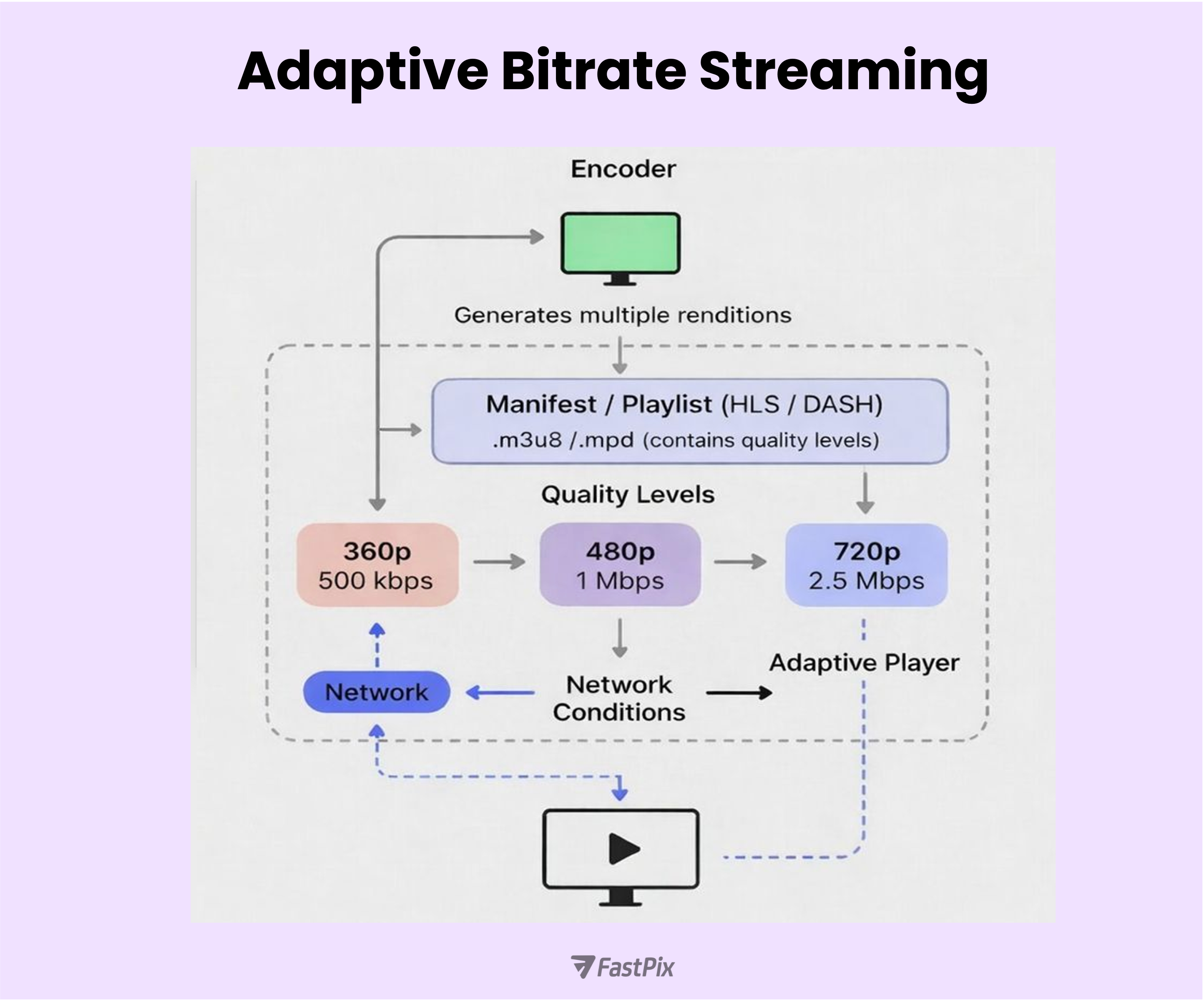
At a high level, ABR works like this:
When networks are unstable, a few tuning choices make a big difference:
ABR doesn’t fix bad networks, but it prevents them from killing the stream. In practice, it’s one of the most important decisions you can make for reliable live playback.
Dropouts will happen. The mistake is treating every disconnect as the end of a stream.
A reconnect window gives the system time to recover instead of shutting everything down immediately. When the connection drops, the stream is put on hold for a short period, waiting for the encoder to come back.
In practice, this usually works like this:
Most platforms default to around 60 seconds, which covers common issues like brief network drops or encoder restarts.
A few refinements make this even more reliable:
Handled well, short disconnections fade into the background. Handled poorly, they’re the moment viewers leave.
Build multi-layered error recovery and intelligent buffering
Resilience doesn’t live in one place. It has to exist across the entire stack, from the player to the backend.
On the player side, recovery should be automatic and quiet:
On the server side, visibility matters just as much as recovery:
A few buffering practices help tie this together:
When recovery and buffering are designed together, most failures never become visible. Streams pause less, recover faster, and feel far more reliable, even on bad networks.
A resilient live streaming setup doesn’t rely on one smart component. It works because every layer does its job and fails safely when needed.
At a high level, the flow looks like this:
None of these layers is optional. Reliability comes from how well they work together, not from over-optimizing a single part of the pipeline.
The player gets most of the attention, but the backend is what keeps a live platform usable when things get messy. It’s responsible for creating streams, tracking state, handling reconnects, updating settings, and keeping everything available even when networks or traffic spike.
At the foundation are well-designed APIs. These APIs let broadcasters and apps interact with the system in predictable ways:
These endpoints should always be authenticated and rate-limited. Live systems see retries and spikes by nature, and APIs need to stay stable under that pressure.
To scale this reliably, most platforms split responsibilities into microservices. Each service owns a specific part of the system, so failures don’t cascade:
Containerized deployments and orchestration make it easier to scale each service independently based on load.
To keep services loosely coupled, event-driven communication matters. Instead of everything calling everything else synchronously, services publish events and react to them:
Synchronous APIs still have a role, especially for direct queries like stream status. But they need guardrails. Circuit breakers, timeouts, and sensible fallbacks prevent one slow service from dragging the entire platform down.
When APIs, microservices, and events work together, the backend becomes invisible in the best way. User actions stay responsive, failures stay contained, and the platform keeps running even when the network doesn’t cooperate.
For broadcasters
For platform developers
For viewers
The common theme is simple: assume networks will fail, and design every layer so failure doesn’t end the experience.
If building all of this from scratch feels like a lot, that’s because it is. A resilient live stack touches ingest, encoding, delivery, players, analytics, and recovery logic. Getting every edge case right takes time.
FastPix implements many of these patterns out of the box, with a focus on developer control rather than rigid workflows.
At a platform level, FastPix supports the core building blocks you need for unreliable networks:
This makes FastPix especially useful for scenarios where connectivity is unpredictable, field reporting, mobile events, remote contributors, or high-traffic broadcasts where reliability matters more than ideal conditions. Check their documentation for quick-start guides, API references, and SDKs (Python, Node.js).
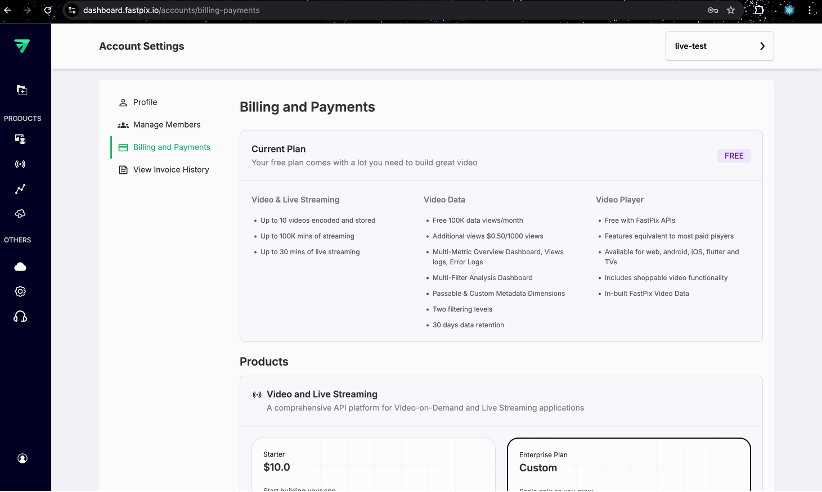
FastPix also keeps the barrier to testing low. The free tier is designed for developers who want to experiment, prototype, or validate assumptions:
That’s enough to run realistic tests. You can create a stream, push via SRT or RTMP, intentionally throttle bandwidth or introduce packet loss, and watch how reconnects, buffering, and analytics behave in real time. Check the pricing section for more details.
When you need more, longer streams, higher volume, or production usage you can move to paid plans with usage-based pricing. There’s no forced jump to enterprise contracts just to keep testing.
A typical test flow looks like this:
The point isn’t that FastPix hides complexity. It’s that it gives you a production-grade baseline, so you can focus on validating your streaming experience instead of rebuilding resilience from scratch.
Resilient live streaming isn’t about eliminating failure. It’s about designing for it.
In practice, that means a few clear choices. Use SRT when networks are unpredictable and keep RTMP for compatibility. Make adaptive bitrate streaming mandatory, with a sensible quality ladder and short segments. Give streams time to recover with reconnect windows and clear state tracking. Build recovery into every layer, from the player to the backend. And expose flexibility through APIs, configuration, and webhooks so systems can react automatically.
Whether you build these pieces yourself or rely on a platform like FastPix, the mindset is the same. Network issues aren’t exceptions, they’re normal operating conditions. When your system expects instability and recovers quietly, broadcasters stay confident and viewers keep watching.
Additional Resources


.avif)

.png)

