.svg)
.svg)
PRODUCTS

You're here because you're trying to build something very specific:
A platform where users upload long-form videos, courses, tutorials, interviews and other users can stream them smoothly, securely, and reliably. Maybe it’s for education, maybe it’s for creators or maybe it’s internal media at scale.
Either way, the job is the same:
You need to build a YouTube-style experience and your backend is in Python.
That’s when the real questions start showing up:
And this is the point where most developers realize: video isn’t just a feature, it’s its own system.
You started with a clean Python stack: FastAPI, PostgreSQL, maybe Celery for jobs. But now you’re stitching together ffmpeg scripts, CDN configs, analytics events, token logic, and wondering how deep this rabbit hole goes.
This guide walks through how to build that kind of platform in Python the full thing and where you can cleanly offload the video infrastructure layer using FastPix.
Building a YouTube-style platform with Python means much more than handling uploads and playback. You need scalable ingestion, adaptive encoding, secure delivery, moderation, analytics, and cross-device streaming, all of which quickly turn video into its own complex system. Python is ideal for managing APIs, user logic, and data workflows, but running the full video infrastructure in-house adds long-term operational overhead. Platforms like FastPix handle the heavy lifting uploads, encoding, playback, live streaming, moderation, and analytics so your backend stays focused on product logic while video works reliably at scale.
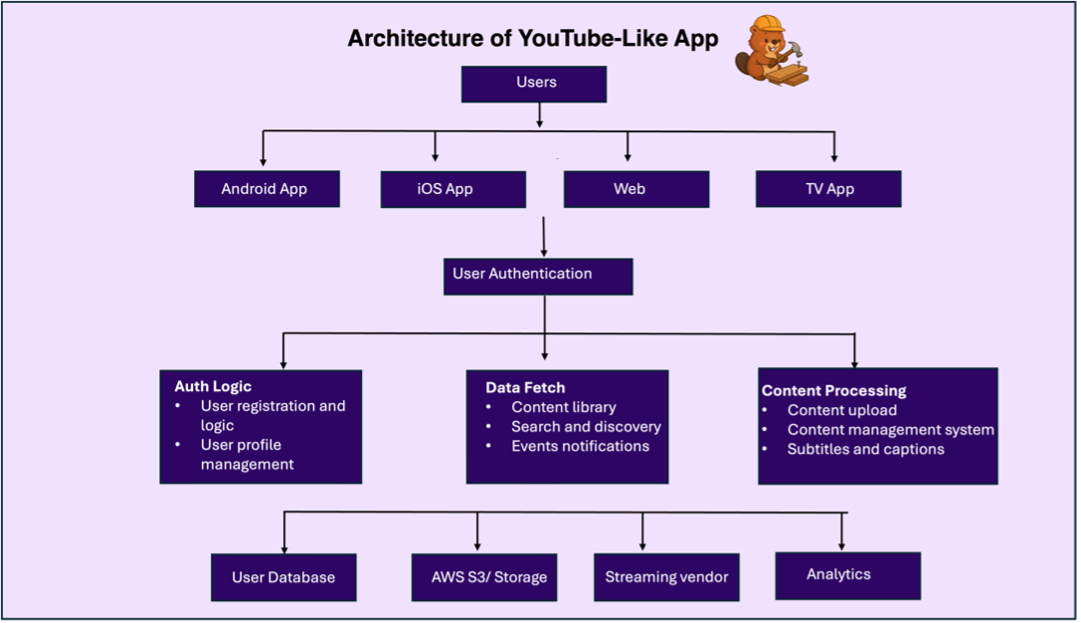
A video app like YouTube may look simple on the surface, users upload videos, others watch, comment, and share. But underneath, you're building an entire ecosystem of backend systems, user interfaces, cloud services, and real-time pipelines that all need to work together seamlessly.
At the client layer, you’ll have apps on Android, iOS, web, and potentially smart TVs, all connecting to a shared backend through secure APIs. Every user interaction, whether it’s uploading a video, fetching a feed, or liking a comment, flows through an API gateway that handles authentication, rate limiting, and request validation.
Once requests hit your backend (often a serverless layer like AWS Lambda), they're routed to different services depending on the use case. You’ll need logic for account registration, profile management, content upload, video processing, and search. Each function connects to different downstream systems: object storage for raw video, a database for user data and metadata, ETL pipelines for analytics, and a video processing pipeline to handle encoding, thumbnails, and renditions.
Search and feed logic must be dynamic and personalized, showing trending videos, subscriptions, or category-based results. Moderation comes next: NSFW detection, flagging systems, and admin review dashboards are essential to keep the platform safe. And to tie everything together, you’ll need analytics pipelines to track engagement, drop-offs, completions, and playback errors, all visualized in reporting dashboards for your team or creators.
Below is a breakdown of the full stack you’ll need to build, mapped to the roles shown in your architecture.
Python gives you the right balance between speed of development and architectural control. You get the flexibility to move fast at the prototype stage, and the composability to scale when the real traffic hits.
With Python, you're not reinventing infrastructure. You're designing systems that talk to each other cleanly: APIs, queues, storage, background jobs, search, and analytics. You get the full stack of tools needed to orchestrate video uploads, manage metadata, moderate content, serve feeds, and track engagement.
Here’s what that stack typically looks like:
The benefit of Python here is that the ecosystem gives you production-grade primitives without heavy boilerplate:
With Python, you own the control plane. You decide how feeds are built, how moderation works, how creators are onboarded, and how analytics are recorded. And that’s important, because the moment you want to personalize feeds, restrict access, or build creator tools, the logic has to live in your backend.
What if you built it all yourself?
If you're thinking, "We could just stitch this together with open-source tools and AWS," you're not wrong. It’s possible. In fact, many dev teams try exactly that.
But here’s the thing: when you choose to build every part of your video infrastructure in-house, you’re not just writing code, you’re taking on a long-term operational and engineering burden. One that never goes away.
You’ll be managing queues, compute, failover, observability, transcoding efficiency, ABR packaging, NSFW filters, delivery optimization, CDN tokenization, user privacy, and analytics pipelines. And doing it reliably. At scale.
Let’s break that down.
If building everything yourself sounds like a maintenance nightmare, you’re not alone.
Most modern platforms don’t build their own CDN, encoding farm, or moderation pipeline. They use specialized tools and vendors to handle the heavy lifting, just like they use Stripe for payments or Auth0 for login.
The same logic applies to video infrastructure.
Because video infrastructure isn’t just one problem, it’s ten interconnected subsystems that all need to scale. With FastPix, you're not outsourcing control. You're outsourcing the complexity.
Instead of building your own:
You can use FastPix’s pre-built, production-ready APIs and SDKs to plug video into your platform in hours, not weeks. You own the product. We handle the video. Take a look at our docs and guides to get a complete view of what FastPix provides.
Once your backend is ready to handle users, feeds, and moderation logic, it’s time to plug in the video infrastructure. FastPix’s Python SDK gives you access to both sync and async clients, so you can integrate video workflows directly into your FastAPI or Flask app, without spinning up encoding queues, job workers, or CDN layers.
Let’s walk through the core building blocks you’ll implement.
Step 1: Install and authenticate
Install the FastPix SDK using pip:
pip install git+https://github.com/FastPix/python-server-sdk
Then initialize the SDK client in your app using your FastPix access token and secret key. You can choose between the sync or async version depending on your backend architecture.
For sync:
from fastpix import Client client = Client(
username="YOUR_ACCESS_TOKEN",
password="YOUR_SECRET_KEY")
For async:
from fastpix import AsyncClient
async_client = AsyncClient(
username="YOUR_ACCESS_TOKEN",
password="YOUR_SECRET_KEY")
Use the sync client for simple, blocking tasks (e.g., admin tools, API routes), and async when you’re running multiple video operations concurrently (e.g., mass uploads, background tasks).
Step 2: Upload a video
You can upload videos either by providing a URL or by generating a pre-signed upload URL for file uploads from your client. Here’s how to upload from a remote URL:
upload = client.media.create_pull_video({
"inputs": [{"type": "video", "url":
"https://example.com/myvideo.mp4"}],
"metadata": {"title": "My Demo Video"},
"accessPolicy": "public",
"maxResolution": "1080p"})
video_id = upload["id"]
This triggers FastPix to fetch, ingest, and process the video, generating multiple resolutions, HLS manifests, thumbnails, and more. You’ll get a video_id that links this asset across all your backend systems.
Step 3: Generate a playback ID
Once the video is processed, you’ll need a playback ID to embed the stream or generate signed URLs.
playback = client.media_playback_ids.create(video_id, {
"accessPolicy": "public"})
playback_id = playback["playback_id"]
Use this ID to embed the video securely in your player, mobile app, or web frontend.
Step 4: Fetch media info or update metadata
Need to fetch duration, resolution, status, or encoding progress? You can retrieve media details at any time:
info = client.media.get_media_info(video_id)
Or update the title, tags, or other metadata:
client.media.update(video_id, { "metadata": {"title": "Updated Title", "tags": ["music", "reaction"]}})
This keeps your internal database and UI in sync with the video metadata stored in FastPix.
Step 5: Build live streaming flows (optional)
If your app supports live content creator livestreams, webinars, or events, you can use the same SDK to create and manage livestreams.
Create a livestream with your desired settings:
live = client.livestreams.create({ "title": "My Live Event", "accessPolicy": "private", "maxResolution": "1080p"})
You can retrieve ingest URLs (for OBS), playback info, and update or delete live streams just like VOD content. Livestreams can also be simulcasted to other platforms, or recorded to VOD automatically.
Step 6: Combine with your backend logic
Once you’ve wired up these methods, plug them into your backend:
Your Python app handles the logic, auth, and control flow, the FastPix SDK handles video ingest, encoding, playback, and lifecycle management. You can find the complete procedure documented here in python sdk guides.
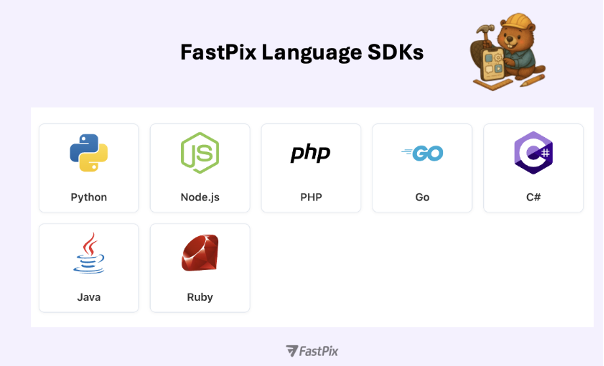
While this guide walks through the Python SDK, FastPix wasn’t built just for one language or one framework. Video infrastructure needs to sit cleanly inside your stack, whether you’re building your backend in Node.js, Go, PHP, or managing playback on iOS, Android, or Flutter.
That’s why FastPix provides language-specific SDKs for both server-side and client-side development. Each one is designed to help you integrate uploads, playback, analytics, moderation, and live workflows into your app, without building a separate video pipeline from scratch.
Server SDKs: Control, scale, and automate
Whether you're building an API-first backend or a complex CMS, the server SDKs let you control video workflows from your app logic:
All of these expose the same media lifecycle operations: upload, fetch, encode, playback, metadata update, and content moderation, behind a secure and unified interface. Check out our guides to know all the language SDKs we provide.
Client SDKs: Playback, upload, and real-time tracking
The frontend side of video is where experience lives, buffering, seek, quality, playback time, and engagement. FastPix’s client SDKs are built to help you deliver that smoothly:
Once your core video workflows are integrated, uploads, playback, metadata, and analytics there are additional capabilities you can enable to meet more advanced requirements. These aren’t side features. They’re common, often necessary parts of a complete video platform.
FastPix is designed to support those scenarios directly through the SDK.
1. Live streaming
If your platform needs real-time broadcasting, for events, webinars, creator livestreams, or scheduled content, you can create and manage livestreams using the same SDK you already use for VOD.
Each stream supports:
No separate infra or services are needed. It runs on the same pipeline as your existing media workflows.
You’ll find the full details in our live streaming docs and guides.
2. AI-based video intelligence
For platforms that work with longer-form or high-volume content, manual editing and tagging don’t scale. FastPix includes built-in video understanding features powered by AI:
These features integrate cleanly into your existing workflows, no external AI stack or pipeline is required.
3. Playback security & policy enforcement
If your platform includes paid, sensitive, or restricted-access content, FastPix includes configurable security layers to enforce control at playback:
These features can be applied at the media or playback ID level, depending on your policy logic.
All of these capabilities work on top of the same system. You don’t need to integrate another vendor or fork your backend logic. The SDKs you’re already using, Python, Node.js, Go, PHP, mobile or web can access these features as your platform requirements expand. Whether you need to support live streaming, build a chaptered video library, or enforce playback policies, it’s already built in.
Your application logic, your APIs, your user experience, that’s your domain. But video infrastructure is its own system. One that usually needs separate tooling, separate queues, and a lot of operational overhead.
FastPix gives you the full pipeline upload, encoding, playback, moderation, and analytics in one SDK. No patchwork, no third-party stitching. Just clean, production-ready tools built for platforms that take video seriously.
If you're building something real and want video that fits your architecture, you can sign up and start integrating instantly. If you prefer a conversation first, reach out to us we’re happy to help you think through your stack. And if you want to stay close to the community and our engineering updates, join our Slack anytime.
Yes. Python is a solid choice for building the control plane of a video platform APIs, authentication, user management, feeds, moderation logic, and analytics pipelines. What usually becomes challenging is the video infrastructure itself: uploads, encoding, adaptive streaming, playback security, and real-time analytics. Most teams keep their backend in Python and offload the video layer to a dedicated video API like FastPix.
You can, but most teams regret it once traffic grows. Running FFmpeg jobs means managing queues, autoscaling compute, retries, failures, and bitrate ladder tuning. With FastPix, uploads trigger automatic encoding, HLS/DASH packaging, thumbnails, and renditions without you managing any of that infrastructure in your Python backend.
A typical approach is direct-to-cloud uploads using pre-signed URLs, resumable uploads, and chunking. FastPix handles this for you so your Python servers don’t become a bottleneck or memory sink. Your backend only tracks metadata and permissions, not the raw video bytes.
FastPix automatically generates adaptive bitrate streams and serves them via HLS or DASH. This ensures smooth playback across web, mobile, OTT, and varying network conditions without device-specific logic in your Python code.
Playback security is handled at the video layer. FastPix supports tokenized playback, signed URLs, DRM (Widevine, FairPlay, PlayReady), watermarking, and geo/IP restrictions. Your Python backend decides who can watch; FastPix enforces how playback happens.
Yes. FastPix includes built-in playback analytics that track events like start, pause, buffering, completion, errors, and quality changes. This avoids wiring together separate players, analytics SDKs, and logging pipelines just to understand viewer behavior.
FastPix supports automated moderation workflows such as NSFW detection and risky content filtering. Your Python backend can use these signals to block, review, or flag content before it goes live, instead of relying purely on manual moderation.
Yes. The same Python backend and FastPix SDK can manage both VOD and live workflows. You can create livestreams, ingest via RTMP or SRT, enable live captions, record streams to VOD, and even simulcast, without building a separate live infrastructure.


.avif)

.png)

