.svg)
.svg)
PRODUCTS

Your content ops team ships 120 episodes per week across three short-drama series. Each episode is 45 to 90 seconds. Each one needs 1080p encoding, three aspect ratio variants, burned-in subtitles, a thumbnail that is not a black frame, and metadata that ties it back to the right series, season, and episode number. That is 120 jobs, each with five or six sub-tasks, every single week.
For the first 20 episodes, your team handled it manually. Someone ran FFmpeg scripts. Someone else spot-checked thumbnails. A producer matched subtitle files to episodes in a spreadsheet. It worked. Slowly, but it worked.
Then volume doubled. Two episodes got swapped metadata. A subtitle file drifted 400 milliseconds on a fast-cut dialogue scene, and nobody noticed until a user posted a screenshot on Reddit. Your pipeline did not fail dramatically. It failed quietly, in the ways that erode trust. And that is the harder problem to solve, because by the time you see the damage, it has been live for days.
Scaling post-production for 1-minute episodes is not an encoding problem. It is an orchestration problem. Each episode needs encoding, thumbnails, subtitles, and multi-aspect-ratio outputs, and at 100+ episodes per week, manual pipelines break silently.
Key takeaways:
Post-production workflows were designed for long-form content. A 45-minute episode justifies 3 hours of manual QA. A 1-minute episode does not. But that 1-minute episode still needs the same number of processing steps: ingest, encode, generate thumbnails, create subtitle tracks, produce aspect ratio variants, attach metadata, push to CDN.
The math gets ugly fast. Industry estimates suggest post-production can account for a quarter to a third of total video project cost. When you are producing 100 episodes a week instead of 2, that percentage does not shrink. It compounds.
Here is what actually happens at scale:
The bottleneck is not processing power. It is the number of handoffs between disconnected tools, and the metadata that gets lost at each one. Your encoding tool does not know your episode numbering. Your subtitle tool does not know your encoding settings. Your thumbnail generator does not know which frame matters.
Research from The Streaming Wars (2026) puts the global short-drama market in the multi-billion-dollar range and growing fast. That kind of growth means teams are scaling from dozens to hundreds of episodes per month. The ones doing it with duct-taped FFmpeg scripts and shared Google Sheets are the ones posting production incident postmortems.
Before wiring anything together, map the actual requirements. Not what a generic video pipeline handles. What a short-drama pipeline specifically needs.
Per-episode outputs:
Per-batch requirements:
That is a lot of moving parts for a video barely longer than a TikTok. But that is production-grade short-drama distribution in 2026.
The core idea is simple: replace every manual step with an API call, and chain them together with webhooks. One event triggers the next. No human in the loop unless something breaks.

Each node is an API call. Each transition is a webhook. The entire pipeline runs without anyone logging into a dashboard, dragging files, or matching subtitle tracks to video files in a spreadsheet.
This is where an API-based video platform becomes useful. FastPix supports this workflow through a single API: high-volume ingest, metadata-rich processing, and multi-output delivery.
Every episode enters the pipeline through a single API call. The key is attaching production metadata at ingest time so it follows the asset through every downstream step.
curl -X POST https://api.fastpix.io/v1/on-demand \
  -u "$ACCESS_TOKEN_ID:$SECRET_KEY" \
  -H "Content-Type: application/json" \
  -d '{
    "inputs": [
      {
        "type": "video",
        "url": "https://storage.example.com/raw/s02e047-final.mp4"
      }
    ],
    "metadata": {
      "series_id": "love-in-seoul",
      "season": "2",
      "episode_number": "47",
      "language": "en",
      "release_date": "2026-04-05",
      "content_rating": "PG-13",
      "production_batch": "batch-2026-w14"
    },
    "mp4Support": "standard"
  }'
That metadata is not decoration. It is what keeps episode 47 from getting tagged as episode 48 when your pipeline processes 30 files in parallel. Every downstream system reads from this single source of truth.
The production_batch field matters more than you would think. When something goes wrong, being able to query "show me every episode from batch W14" saves hours of forensic debugging. Without a batch identifier, teams lose entire days figuring out which episodes were affected by a bad encoding preset.
Fixed bitrate ladders treat every scene the same. A static dialogue shot and a rain-soaked chase sequence both get 4 Mbps at 1080p. The dialogue scene does not need it. The chase scene is starving.
Context-aware encoding flips this. It analyzes each episode's visual complexity scene by scene and adjusts bitrate allocation. For short-drama content, where scenes alternate between tight close-ups and wider establishing shots, this approach can reduce storage by up to 66% compared to fixed ladders. Same visual quality. Dramatically less bandwidth.
Thumbnails are generated automatically during the encoding step. No separate job, no extra API call. The system selects frames based on visual interest, avoiding black frames, transition frames, and motion-blurred shots that plague auto-thumbnail generators.
This is the step that breaks most manual pipelines. Every episode needs to ship in at least three aspect ratios: vertical for short-video platforms, widescreen for OTT apps, and square for social feeds.
Auto reframe uses AI to track the primary subject in each frame and reposition the crop window accordingly. A character walks from screen left to screen right in a 16:9 shot. The 9:16 vertical version follows them. No manual keyframing. No editor spending 20 minutes per episode adjusting crop positions frame by frame.
Research indicates that the share of AI-generated videos in vertical format has grown significantly since 2024, with some estimates placing it above half. That is not a trend. That is the default. If your pipeline cannot produce vertical variants automatically, you are manually creating the majority of your distribution outputs.
Subtitles are not optional for short-drama content. More than half of mobile viewers watch with sound off. If your 1-minute drama episode has no subtitles, you have lost the viewer before the first plot twist.
FastPix In-Video AI handles subtitle generation automatically during processing. The AI transcribes dialogue, generates timed subtitle tracks, and produces scene-level metadata including scene boundaries and descriptions. No separate transcription service. No manual alignment.
Scene detection runs automatically too, with no pipeline setup required. Each scene gets a boundary timestamp and a description of what is happening. This metadata powers in-app search, recommendation engines, and automated clip generation, all downstream features that short-drama platforms rely on for engagement and retention.
The pipeline only works if each step triggers the next one automatically. That is where webhooks come in.
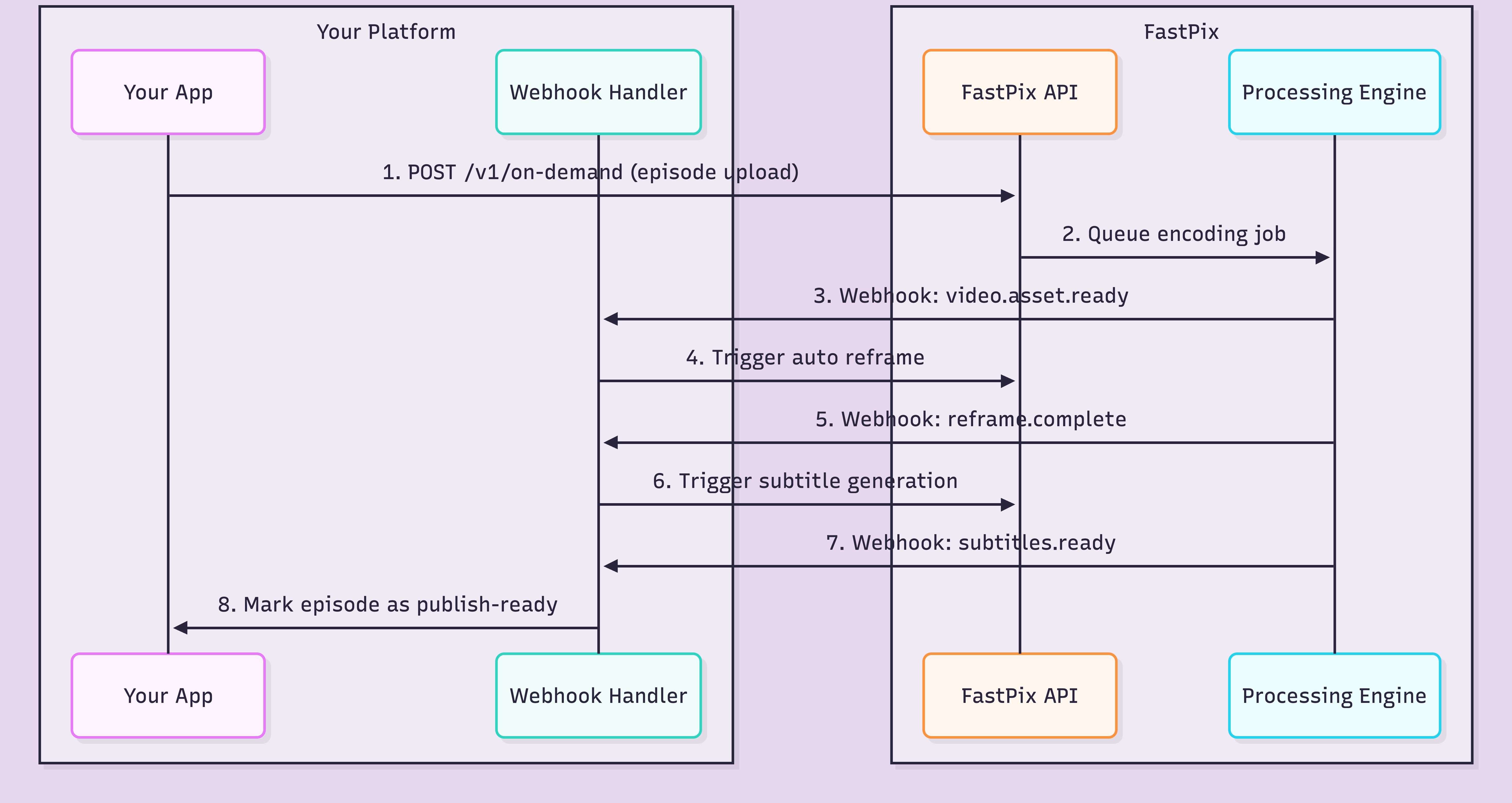
Each webhook carries the asset ID, processing status, and your original metadata. Your handler reads the event type, decides what to trigger next, and fires the appropriate API call. The whole chain runs asynchronously.
Here is what a typical webhook payload looks like when encoding completes:
{
  "type": "video.asset.ready",
  "data": {
    "id": "a1b2c3d4e5f6",
    "status": "ready",
    "playback_ids": [
      {
        "id": "fp_playback_abc123",
        "policy": "public"
      }
    ],
    "metadata": {
      "series_id": "love-in-seoul",
      "season": "2",
      "episode_number": "47",
      "production_batch": "batch-2026-w14"
    },
    "duration": 62.4,
    "aspect_ratio": "16:9"
  }
}
Your metadata comes back intact. Your webhook handler matches it to the right series, the right season, the right episode. No spreadsheet. No filename matching. No "which version of episode 47 is the right one" Slack messages at 11pm.
One critical design decision: build your webhook handler to be idempotent. Webhooks can fire more than once. If your handler triggers a re-encode every time it receives a duplicate event, you burn credits and create duplicate outputs. Check asset ID plus status before acting.
The pipeline architecture looks clean on a diagram. In production, at 100+ episodes per week, specific things fail in specific ways. This is not hypothetical. These are the patterns that surface repeatedly.
Silent encoding failures. The job completes. Status says "ready." But the output has a green frame at 0:42 or audio cuts out at 0:38. Automated QA checks on duration and resolution catch obvious failures. They miss corruption that only shows on playback. Build sampling-based review: spot-check 10% of every batch by actually playing the output.
Subtitle sync drift. Fast-cut dialogue scenes with 15+ cuts per minute are the worst case. The transcript is accurate, but timing drifts 200-400 milliseconds across cuts. For a 1-minute episode with rapid dialogue, that drift compounds. Review subtitle timing on your fastest-cut episodes first.
Bad auto-thumbnails. Thumbnail generators pick frames based on visual metrics. But "visually interesting" and "representative of the story" are different things. Black frames between scenes, motion blur during transitions, and close-ups of background extras all score well on metrics and terribly on click-through rate. Human review for thumbnails is the one manual step worth keeping.
Missing aspect-ratio variants. If the reframe step fails silently and your distribution system does not check for all three variants before publishing, you ship a 16:9-only episode to TikTok. Black bars. Engagement drops. Your content team does not realize it for two days because they review on desktop.
Queue bottlenecks. Monday morning, 50 episodes from the weekend shoot hit the encoding queue simultaneously. Prioritize by release date, not upload time. Episode 47, due tomorrow, should encode before episode 55, due next week.
Metadata mismatches. The quietest and most damaging failure. Episode 47 gets tagged as episode 48 because someone fat-fingered the upload script. It passes every automated check. The wrong episode goes live under the wrong title. The fix: attach metadata at the API level, not in a separate tagging system downstream.
The infrastructure cost per episode is surprisingly low. The operational cost is where budgets get eaten.
Infrastructure cost per episode (1 minute, 1080p):
At 100 episodes per week, encoding for all three aspect ratio variants runs roughly $48 per month. Not zero, but manageable. That math holds because context-aware encoding keeps file sizes down, which means lower storage and delivery costs downstream.
Here is the thing, though. Infrastructure cost is the part you can predict. Operational cost is the part that hurts.
Operational costs that add up:
A single batch-wide encoding failure affecting 30 episodes costs more in ops time than a month of encoding fees. The pipeline's real expense is not the per-minute rate. It is the cost of failures you catch too late.
The best way to validate this architecture is to test it against your own production volume. Wire up a batch of 10-20 real episodes, check the failure handling, and compare the operational overhead to what your team spends today. If you want to try it with FastPix, the free credits on signup cover enough encoding to run a meaningful test.
With FastPix, encoding a 1-minute episode at 1080p costs roughly $0.03. Delivery adds approximately $0.00096 per minute streamed. For a team shipping 100 episodes per week, encoding alone runs about $3 per week or $12 per month, not counting delivery and storage.
Yes. FastPix In-Video AI generates subtitles automatically during video processing. The AI transcribes dialogue and produces timed subtitle tracks without any manual pipeline setup. This is especially useful for short-drama platforms where most viewers watch on mobile with sound off.
Auto reframe uses AI to detect the primary subject in each frame and automatically crop the video for different aspect ratios. A single 16:9 source file becomes 9:16 for TikTok and Reels, 1:1 for Instagram, and stays 16:9 for OTT. Without auto reframe, teams manually crop every episode for every platform, which breaks at scale.
Webhooks notify your server when each processing step completes. When encoding finishes, a webhook fires and your system triggers the next step, like subtitle generation or auto reframe. This eliminates polling, reduces wasted compute, and lets you chain multi-step pipelines without manual intervention.
The most common failure points are: silent encoding errors that produce bad output nobody catches until viewers complain, subtitle sync drift on fast-cut dialogue scenes, auto-generated thumbnails that land on black frames or transitions, and metadata mismatches when episodes pass through disconnected tools. Webhook retry logic and queue bottlenecks also surface quickly at volume.
Context-aware encoding, also called per-title encoding, analyzes each episode's visual complexity and adjusts bitrate per scene. A dialogue scene in a room gets lower bitrate than a chase sequence. This can reduce storage by up to 66% compared to fixed bitrate ladders, while maintaining equivalent visual quality for viewers.


.avif)

.png)

