.svg)
.svg)
PRODUCTS

At 2 am on a Tuesday, a video platform team flipped DNS to their new provider. By 2:07 am, their webhook handler was crashing on payloads it had never seen before. By 2:15 am, every new upload was stuck in "processing" because a downstream service expected an asset.ready event that the new provider called video.live_stream.completed.
They did not have a rollback plan. They had a rollback hope.
That is how most managed-to-API video migrations actually go. Not broken tooling. Not bad docs. A webhook schema change nobody mapped, and a cutover nobody stress-tested. This playbook is for teams who already decided to leave their managed video platform and now have to actually execute. You know why you are moving. You need to know how not to break production on the way out.
Most teams over-engineer the migration and under-engineer the rollback. Rollback is the load-bearing piece of any video platform migration, not the asset transfer. A disciplined 30-day migration has six phases: inventory and audit, asset migration strategy, webhook and event compatibility shim, player swap and analytics continuity, cutover with a dual-write window, and cost reconciliation. Each phase has a specific failure mode. Skip any of them and you will rebuild parts of your video pipeline in an incident channel at 3am. The playbook below is what we have seen work.
Before you touch anything, understand what breaks in each phase. This is the map.
Each phase is roughly 4 to 6 days of calendar time for a team of two to four engineers. The bottleneck is almost never the tool. It is coordination with whoever owns the downstream services that consume your video events.
You cannot migrate what you cannot see. Before writing a single line of migration code, pull a full inventory from your incumbent provider. Not the one in the dashboard. The real one, via API.
Most teams assume they know their asset count. They are almost always wrong by 10 to 30 percent. Pull these into a single manifest:
You are going to find assets nobody remembered. You are going to find three webhook endpoints pointing at a service that was deprecated two years ago. Document them anyway. Migration is the one time your inventory is actually correct.
Keep it flat. Keep it boring. This is not the place for cleverness.
{
  "asset_id": "src_abc123",
  "playback_id": "plb_xyz789",
  "duration_seconds": 847,
  "size_bytes": 412000000,
  "created_at": "2024-11-03T14:22:00Z",
  "last_played_at": "2026-04-02T09:11:00Z",
  "status": "ready",
  "tier": "hot",
  "source_url": "s3://backup/src_abc123.mp4",
  "downstream_consumers": ["recommendation_api", "search_index"],
  "migration_status": "pending"
}
last_played_at is the most important field in this schema. It drives your hot/cold/archive split in Phase 2. If your incumbent does not expose it, pull 90 days of playback analytics and backfill it before moving on.
Nobody migrates their whole library the same way. The teams that try usually give up around day 18.
Run the math on your manifest. You will almost always find the same pattern: roughly 10 to 20 percent of your library drives 80 to 90 percent of your views. Bitmovin's 2025 Video Developer Report noted that long-tail catalog usage has flattened across OTT and EdTech, which matches what we see in the field.
This split is what makes a 30-day migration possible. Teams that treat every asset as equally important are teams that miss their deadline.
Here is the decision nobody wants to make explicitly. Make it explicitly.
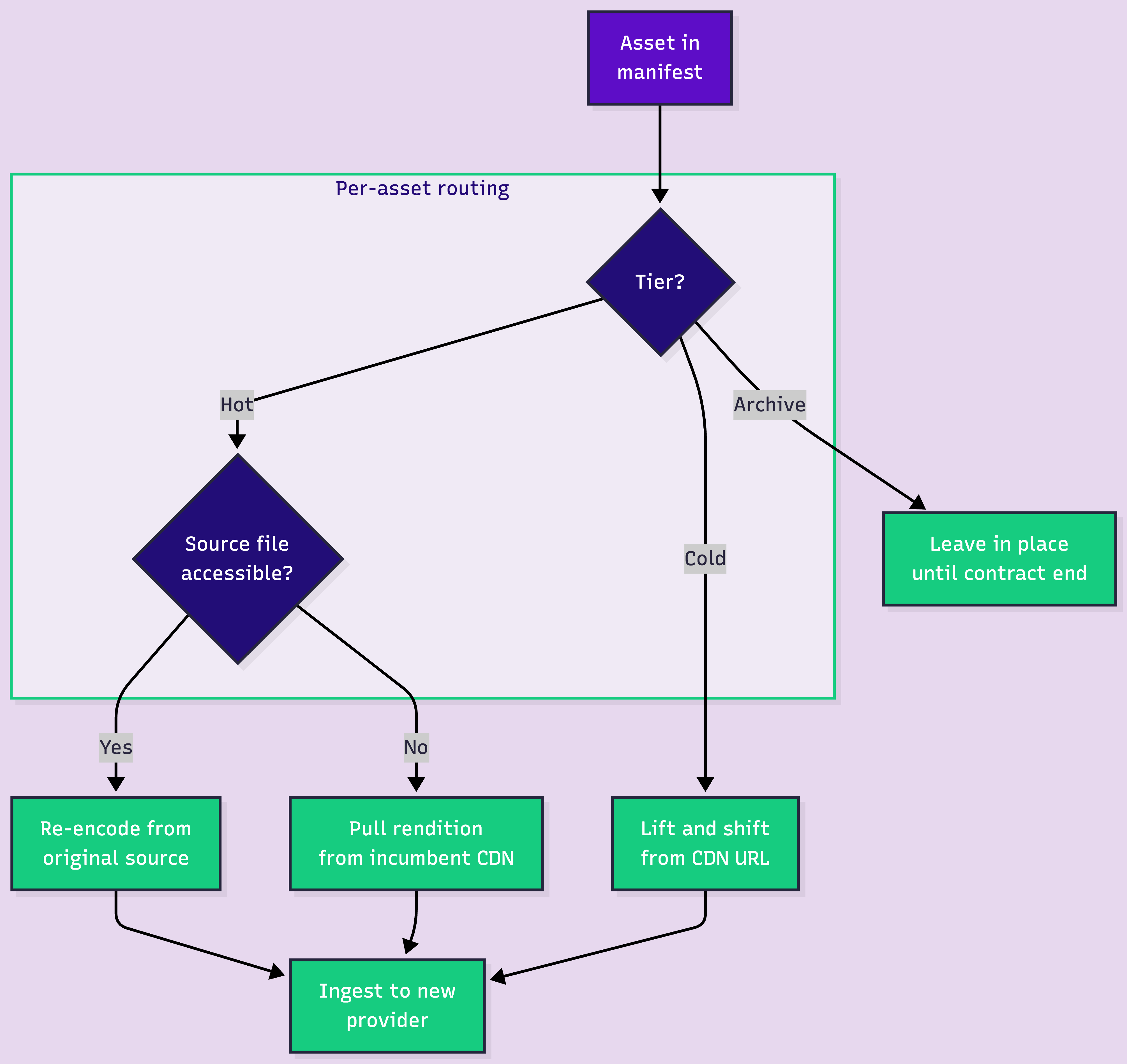
Lift-and-shift hot assets first, using the existing CDN URLs as the source. Re-encode only when you have the original masters and a clear reason: better per-title encoding, a new codec like AV1, or compliance requirements. Re-encoding your entire library on day one is the fastest way to blow your timeline.
This is where most migrations actually die. Not in the transfer. In the event schema mismatch nobody mapped.
Your downstream services (recommendation engine, search indexer, billing, email triggers, analytics warehouse) all subscribe to webhook events from your current provider. They expect a specific payload shape. The new provider has a different shape. If you try to rewrite every consumer to speak the new schema, you will touch 15 services in 12 different repos owned by 8 different people.
You will not finish in 30 days. You might not finish in 90.
Build a shim instead. One service, one job: receive webhooks from the new provider, translate them into your old schema, re-emit them to your existing consumers. The downstream services never know you switched.
# webhook_shim.py — pseudo-code, not production
from flask import Flask, request, jsonify
import requests

app = Flask(__name__)

# Map new provider event names to your legacy schema
EVENT_MAP = {
    "video.asset.ready": "asset.processed",
    "video.asset.errored": "asset.failed",
    "video.live_stream.active": "live.started",
    "video.live_stream.idle": "live.ended",
}

@app.route("/shim/webhooks", methods=["POST"])
def translate_webhook():
    payload = request.json
    new_event = payload.get("type")
    legacy_event = EVENT_MAP.get(new_event)

    if not legacy_event:
        # Unknown event. Log and drop. Do NOT crash.
        log_unknown_event(new_event, payload)
        return jsonify({"status": "ignored"}), 200

    legacy_payload = {
        "event": legacy_event,
        "asset_id": payload["data"]["id"],
        "playback_id": payload["data"].get("playback_ids", [{}])[0].get("id"),
        "duration": payload["data"].get("duration"),
        "status": payload["data"].get("status"),
        "timestamp": payload["created_at"],
    }

    # Fan out to every existing consumer
    for consumer_url in LEGACY_CONSUMERS:
        requests.post(consumer_url, json=legacy_payload, timeout=5)

    return jsonify({"status": "translated"}), 200
Three rules for the shim. Never crash on unknown events — log and drop. Always preserve the original asset_id mapping so downstream services can correlate. Add a feature flag that lets you route a percentage of webhooks through the shim vs the old provider. You will need it during cutover.
The player swap looks easy. It is not. Not because the SDKs are hard. Because analytics history is fragile.
Run both players in parallel for 5 to 7 days. Your existing embeds keep serving traffic from the old provider. New embeds point at the new provider. Use a feature flag or a percentage rollout to shift traffic gradually. 5 percent, then 20, then 50, then 100. If something breaks at 20, you caught it before 80 percent of your users noticed.
The worst thing you can do is swap the player globally on day one. You are trading a known player with known quirks for a new player with quirks you have not discovered yet. Give yourself time to discover them on a small slice of traffic.
This is the silent killer. Your QoE dashboards have 12 months of playback data tied to your old provider's view IDs. The day you cut over, your new provider starts generating new view IDs. If you do not plan for this, your dashboards flatline and your product team loses 12 months of trend data.
Two options that actually work. Export your old analytics to a warehouse (Snowflake, BigQuery, ClickHouse) before you cut over. Then ingest the new provider's analytics into the same warehouse with a provider tag. Your dashboards stitch across both. The other option is to use a provider with free-tier analytics at enough volume that you can run both side by side during the transition. We give Video Data away free up to 100K views per month, precisely because analytics should not be the thing that blocks a migration.
Say it out loud. Rollback is the load-bearing piece of your migration. Everything else is optional polish. If your rollback works, you can take risks in the other phases. If your rollback does not work, nothing else matters.
For 48 to 72 hours, every new upload goes to both providers in parallel. Playback can come from either. Webhooks fire from both, deduplicated by the shim. This is expensive. You are paying two bills for two days. Pay it anyway.
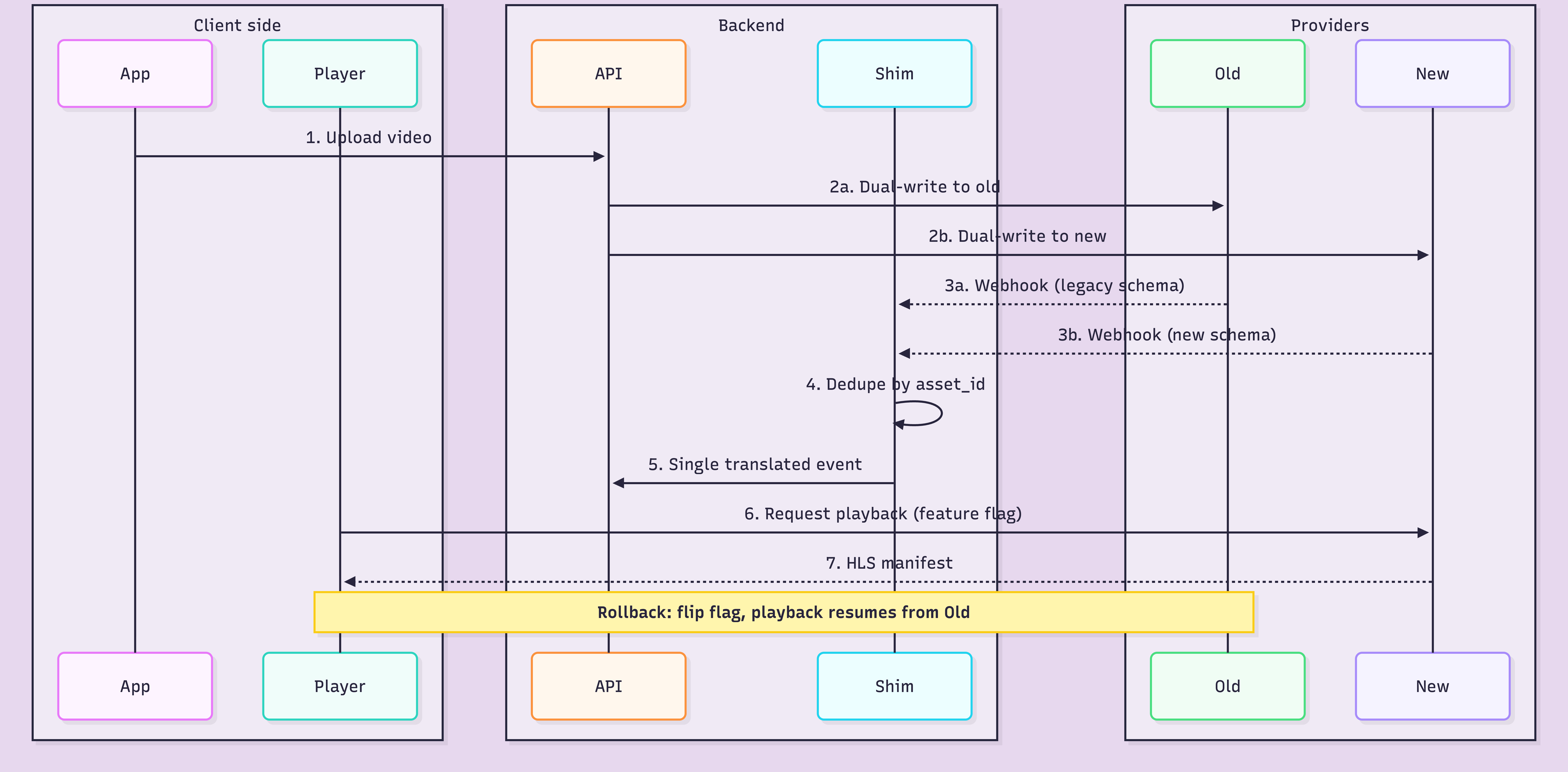
The dual-write window is what makes rollback actually possible. If the new provider has a bad day on hour 12, you flip the feature flag, playback routes back to the old provider, and nobody files a ticket. This is the entire point of the playbook.
A rollback plan is not a Slack message. It is a document with specific commands, specific thresholds, and a specific human who has authority to trigger it. Write it before the cutover. Test it on staging. Assume you will need it.
Minimum contents of a real rollback plan: the exact feature flag to flip and who can flip it, the DNS records to revert (with TTL noted), the webhook consumers to re-point, the monitoring thresholds that trigger rollback automatically (error rate, playback failure rate, webhook lag), the communication template for the status page. Print it. Tape it to the wall. Most teams never write this down because writing it feels like admitting you might fail. That is exactly why you should.
You did the migration to save money or get control. Now prove it. Most teams skip this phase and then cannot defend the migration six months later when the CFO asks what it actually saved.
Pull your new provider's bill for the first 30 days post-cutover. Normalize it to the same unit your old bill used (per minute of video delivered, per GB egressed, per encoded minute). Build a single comparison table with old bill, new bill, and delta per line item.
Watch for the hidden costs: re-encoding charges during the bulk transfer, double-billing during the dual-write window, storage of assets you forgot to delete from the old provider. These will inflate your first-month bill by 15 to 30 percent. Expect it. Don't panic.
For a step-by-step walkthrough on setting up each layer, here's the implementation guide.
We have watched enough of these migrations to know where teams get stuck. Usually it is the webhook shim and the analytics continuity. That is why our whole platform runs on a unified webhook system across on-demand, live, encoding, and playback — one event model instead of six. It makes writing the shim roughly 60 percent shorter. If you want the deeper look, our batch migration docs walk through the asset transfer side.
We also give Video Data away free up to 100K views per month. That is not marketing generosity. It is because teams mid-migration need to run analytics on both providers for a few weeks without a budget fight. Our On-Demand Video API supports standard HLS manifests at stream.fastpix.io/<playbackId>.m3u8, so your existing player code mostly keeps working. And we ship SDKs for Node.js, Python, Go, Ruby, PHP, Java, and C# so the migration script is not a rewrite of your entire backend.
Spin up a test migration with $25 in free credits. Ingest 100 hot assets, build the shim, run a fake cutover on staging. You will learn more about your real migration in a weekend of testing than in a month of planning docs.
About 30 calendar days for a disciplined team of two to four engineers, split across six phases. Teams that skip the inventory phase or the rollback plan usually stretch to 60 or 90 days. The migration itself is not slow. Coordinating with downstream service owners is slow.
Yes, and you should for hot assets. Lift-and-shift uses the existing CDN URL as the source, pulls the rendition into the new provider, and skips re-encoding entirely. Re-encode only when you have the original master files and a reason: per-title encoding, modern codec support, or compliance.
Under-investing in the rollback plan. Most teams spend 80 percent of the migration effort on the asset transfer and 5 percent on rollback. The math should be closer to 50/30 with the rest on webhook shim and analytics. Rollback is not optional, it is the load-bearing piece.
No. Build a compatibility shim that translates new-provider webhook payloads into your existing legacy schema. Your downstream services keep running unchanged. Direct rewrites of every consumer are where migrations die.
Export your old analytics to a data warehouse before cutover, then ingest the new provider's analytics into the same warehouse with a provider tag. Your dashboards stitch across both. Or use a provider with a generous analytics free tier so you can run both in parallel during the transition.
Error rate on ingest (both sides), playback failure rate (both sides), webhook lag through the shim, dedupe accuracy, and bill acceleration on both providers. Set automated rollback triggers on playback failure rate above 2 percent, sustained for 5 minutes.
Not before 14 days of clean metrics on the new provider. The first week is honeymoon traffic. The second week is when real edge cases surface: the weekly report that triggers a bulk analytics query, the monthly billing job, the one weird customer on IE11. Wait.


.avif)

.png)

